> For the complete documentation index, see [llms.txt](https://docs.truvera.io/llms.txt). Markdown versions of documentation pages are available by appending `.md` to page URLs; this page is available as [Markdown](https://docs.truvera.io/truvera-api/ecosystem-tools.md).
# Ecosystem Tools
Verifiable credentials have an advantage over physical documents, because they cannot be forged. However, there is still a fraud risk if a credential is issued by someone that has no authority to do so.
How can a verifier be sure that the credential came from an authorized issuer? And vice-versa, how can a credential holder know which verifiers are trustworthy and that it is okay to share their credentials with them? Ecosystem Tools is a solution to answer this problem.
## What is an ecosystem?
\
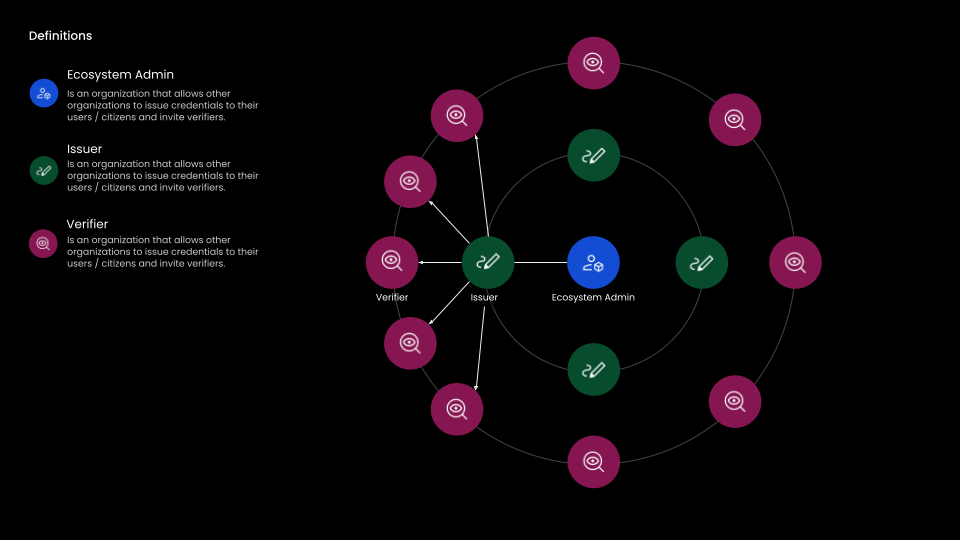
Ecosystem is a network of trusted digital identity issuers and verifiers. It uses a **trust registry,** an on-chain list, that contains information on who is authorized and trusted to issue or verify credentials in a particular ecosystem and which credential schemas they can issue and verify.
Ecosystems are governed by trust frameworks, a set of operating rules that participants of the ecosystem must follow.
## Why use Ecosystem Tools?
A trust ecosystem helps organizations to simplify everyday interactions and have confidence to allow other organizations or people to interact and share fraud-proof and digitally verifiable data.
Governing Authority could register as an Ecosystem Admin in Truvera Workspace where they can establish a Trusted Brand, communicate rules for participation in a Governance Framework, and administer the ecosystem.
By having an on-chain trust registry, credential verifiers do not need to manage a list of valid issuers and holders know which verifiers they can trust to share their credentials with. They only need to trust one Ecosystem administrator.
---
# Agent Instructions
This documentation is published with GitBook. GitBook is the documentation platform designed so that both humans and AI agents can read, navigate, and reason over technical content effectively. Learn more at gitbook.com.
## Querying This Documentation
If you need additional information that is not directly available in this page, you can query the documentation dynamically by asking a question.
Perform an HTTP GET request on the current page URL with the `ask` query parameter, and the optional `goal` query parameter:
```
GET https://docs.truvera.io/truvera-api/ecosystem-tools.md?ask=&goal=
```
`ask` is the immediate question: it should be specific, self-contained, and written in natural language.
`goal` is optional and describes the broader end goal you are ultimately trying to accomplish on behalf of the user. GitBook uses it to tailor the answer towards what is most useful for that goal.
The response will contain a direct answer to the question and relevant excerpts and sources from the documentation.
Use this mechanism when the answer is not explicitly present in the current page, you need clarification or additional context, or you want to retrieve related documentation sections.